As enterprise technology evolves rapidly, organizations that depend on aging legacy systems face increasing operational risk, security exposure, and rising maintenance costs. Recognizing the warning signs early allows engineering leaders to plan a controlled modernization strategy before legacy debt stalls growth. Here are five clear indicators that your legacy system is ready for an upgrade.
1. Frequent Downtime and Maintenance Issues
One of the clearest indicators of an obsolete platform is recurring unplanned downtime. Aging systems frequently struggle under peak workloads and require constant emergency patching, manual restarts, and workarounds that disrupt daily business operations.
When critical workflows stall mid-transaction, the cumulative recovery time directly erodes team productivity and revenue. Furthermore, finding engineers who specialize in deprecated frameworks or legacy runtimes becomes increasingly difficult and expensive over time.
What to do: If your engineering team spends more time troubleshooting outages than shipping product improvements, prioritize a phased modernization plan. Modern cloud-native architectures provide automated failover, observability, and zero-downtime deployments.
2. Incompatibility with Modern Technology
Legacy monoliths rarely integrate cleanly with modern cloud services, analytics pipelines, or API-driven platforms. Without well-documented REST, GraphQL, or webhook interfaces, connecting your core system to contemporary business tools becomes a major bottleneck.
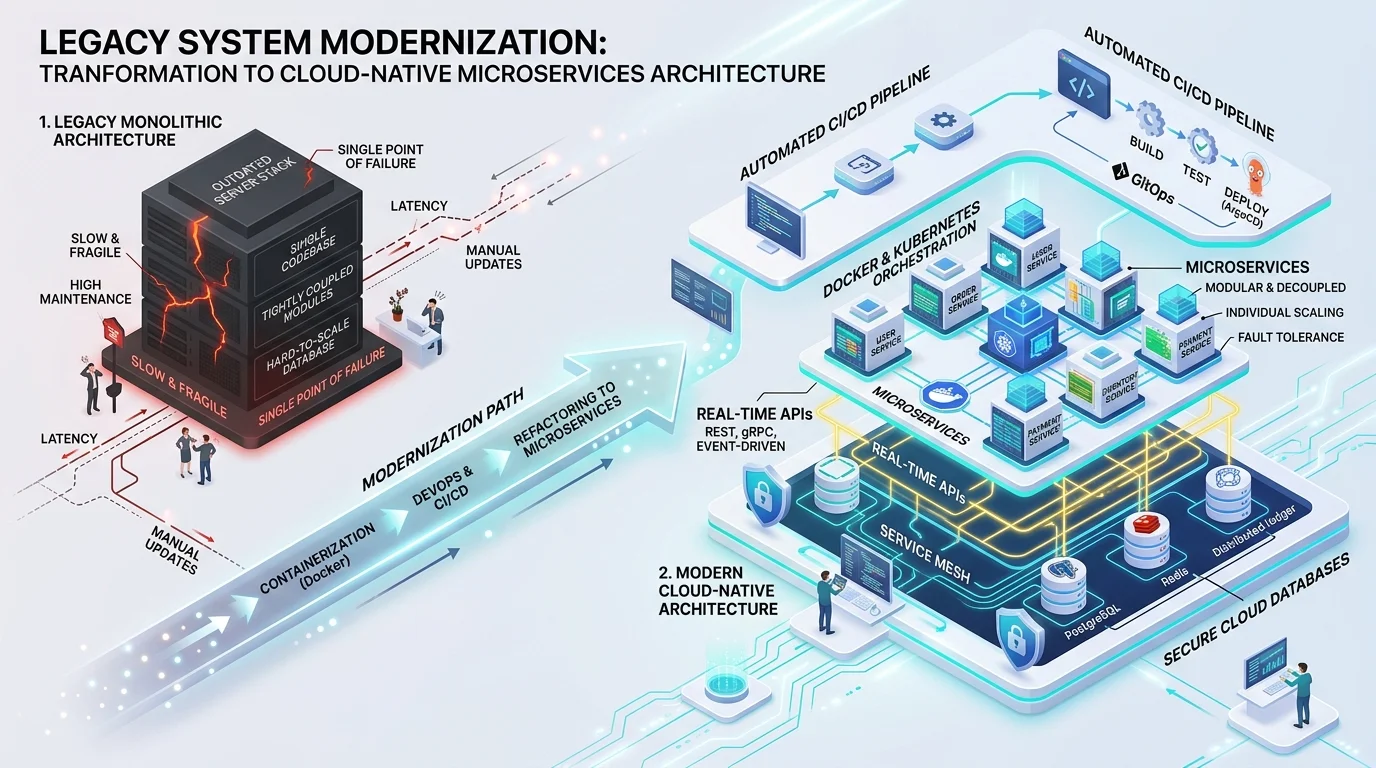
For example, if your CRM cannot sync directly with your legacy ERP, staff are forced to re-enter customer and order records manually across systems. This slows down routine operations and introduces costly data discrepancies.
What to do: Modernizing your core platform—or introducing an API integration layer—enables seamless data synchronization across your entire technology stack.
3. Security Vulnerabilities
Legacy software is a primary target for cyber threats. Older platforms often lack modern security controls such as end-to-end encryption, role-based access control (RBAC), multi-factor authentication, and automated vulnerability scanning.
Once a software vendor or open-source framework reaches End of Life (EOL) and stops issuing security patches, every unpatched dependency becomes a compliance and breach liability.
What to do: Audit your stack for unsupported runtimes and libraries, and migrate critical workloads to actively maintained platforms built with defense-in-depth security standards.
4. Decreased Employee Productivity
Your teams rely on responsive, intuitive software to execute their work efficiently. When core internal tools are slow, rigid, or require clunky multi-step workarounds, daily output suffers across every department.
Over time, forcing employees to navigate outdated interfaces and manual spreadsheets leads to operational friction, delayed customer response times, and higher staff frustration.
What to do: Upgrading to a streamlined, user-centered platform eliminates repetitive manual steps, accelerates onboarding, and lets your team focus on high-value work.
5. Rising Costs with Minimal Benefits
While deferring an upgrade can appear cost-effective in the short term, maintaining legacy infrastructure—including specialized hardware upkeep, emergency contractor support, and licensing extensions—often costs far more than running a modern cloud architecture.
At the same time, holding on to an outdated system carries a steep opportunity cost: you miss out on workflow automation, real-time analytics, elastic scaling, and seamless cross-department integration.
What to do: Evaluate the Total Cost of Ownership (TCO) of maintaining your current system over the next three years against a structured modernization roadmap. For most enterprises, reducing maintenance overhead and unlocking automation delivers a clear return on investment.
Don't wait for a critical outage or compliance failure to force an emergency migration. Auditing your legacy architecture today allows you to modernize incrementally—such as using the Strangler Fig pattern—without disrupting active business operations.
Modernize with Confidence Through REEA Digital
Engineered for Zero-Disruption Transformation.
Upgrading core enterprise software requires careful architectural planning and disciplined execution. REEA Digital specializes in migrating legacy monoliths to secure, scalable, and maintainable platforms—preserving your business logic and historical data while eliminating technical debt.
What makes REEA Digital the right choice for Legacy System Modernization?
The Services We Provide for Legacy System Modernization
Transform Your Legacy System Today
Don't let obsolete technology hold your operations back. Partner with REEA Digital to modernize your core systems and unlock new avenues for growth.
Contact our engineering team or request a consultation to evaluate your legacy architecture and build a clear roadmap for modernization.
Frequently Asked Questions
Answers to common questions about legacy system modernization.
What are the risks of relying on outdated legacy systems?
Relying on outdated legacy systems can expose your business to significant risks, including data breaches due to poor cybersecurity measures, decreased productivity from system inefficiencies, and the inability to stay competitive in the market.
How do I know when it's time to modernize my legacy system?
It's time to consider modernizing your legacy system when you notice signs such as difficulty in scaling operations, increased maintenance costs, and when the system fails to meet evolving business needs or customer demands.
What are the benefits of upgrading legacy software?
Upgrading legacy software can lead to improved system performance, enhanced cybersecurity, better integration with modern systems, increased efficiency, and the ability to leverage new technologies to stay competitive in your industry.
How do legacy systems often struggle with compliance and regulations?
Legacy systems often struggle with compliance because they lack the necessary updates and features to meet current regulations. This can lead to legal challenges and penalties if your business cannot maintain compliance with industry standards.
Is vendor support a critical factor in determining if it's time to upgrade?
Yes, lack of vendor support is one of the key signs that indicate it’s time to upgrade. When a vendor no longer provides updates, patches, or support for legacy software, it can create vulnerabilities and hinder your ability to recognize the signs that indicate the need to modernize your legacy system.